Every creative project depends on safe media transfer. Whether it’s a one-person shoot or a full studio production, both share the same responsibility, protecting the footage captured. Cameras, lenses, and lighting all contribute to the final image, but none of it matters if the files never make it safely off the camera cards. Because the risk that files get lost or corrupted increases as offloads get larger, storing your data on modern drives that interface properly with the latest computer technology is not only a best practice for creators, it is a requirement.
Because of this, media management has become a core part of modern workflows. The ever-growing size of camera files means offloading and organizing cards is no longer a background task handled at the end of the day.
Why Proper Workflows Matter
A proper workflow removes any room for doubt. When the same steps happen the same way every time, teams spend less time troubleshooting and more time creating. Editors know where footage is, producers know it is backed up, and crews can reuse camera cards with confidence. And for solo creators that are responsible for all of these roles, that’s a lot of stress you can kiss goodbye.
Unfortunately, having piles of drives doesn’t necessarily solve this problem. Organization is key, as without structure, even a simple shoot can become confusing. Files end up in different folders, backups may not match the originals, and valuable time is lost searching for clips. Consistency is what prevents these problems, especially as libraries of content evolve and grow.
Storage Performance and Reliability
Hardware plays a large role in dependable backups. High-performance drives with strong sustained write speeds, such at the ATOM EX40, allow data to move smoothly from camera card to storage. When drives struggle to keep up, transfers slow down and errors become more likely.
Fast SSDs are commonly used for initial ingests because they can handle large bursts of data from modern cameras. However, when deciding what hardware fits your needs it should be noted that certain options, such as drives using ThunderBolt 5, will illustrate high data transfer speeds that can be misleading. Often, these advertised speeds are burst speeds rather than sustained speeds.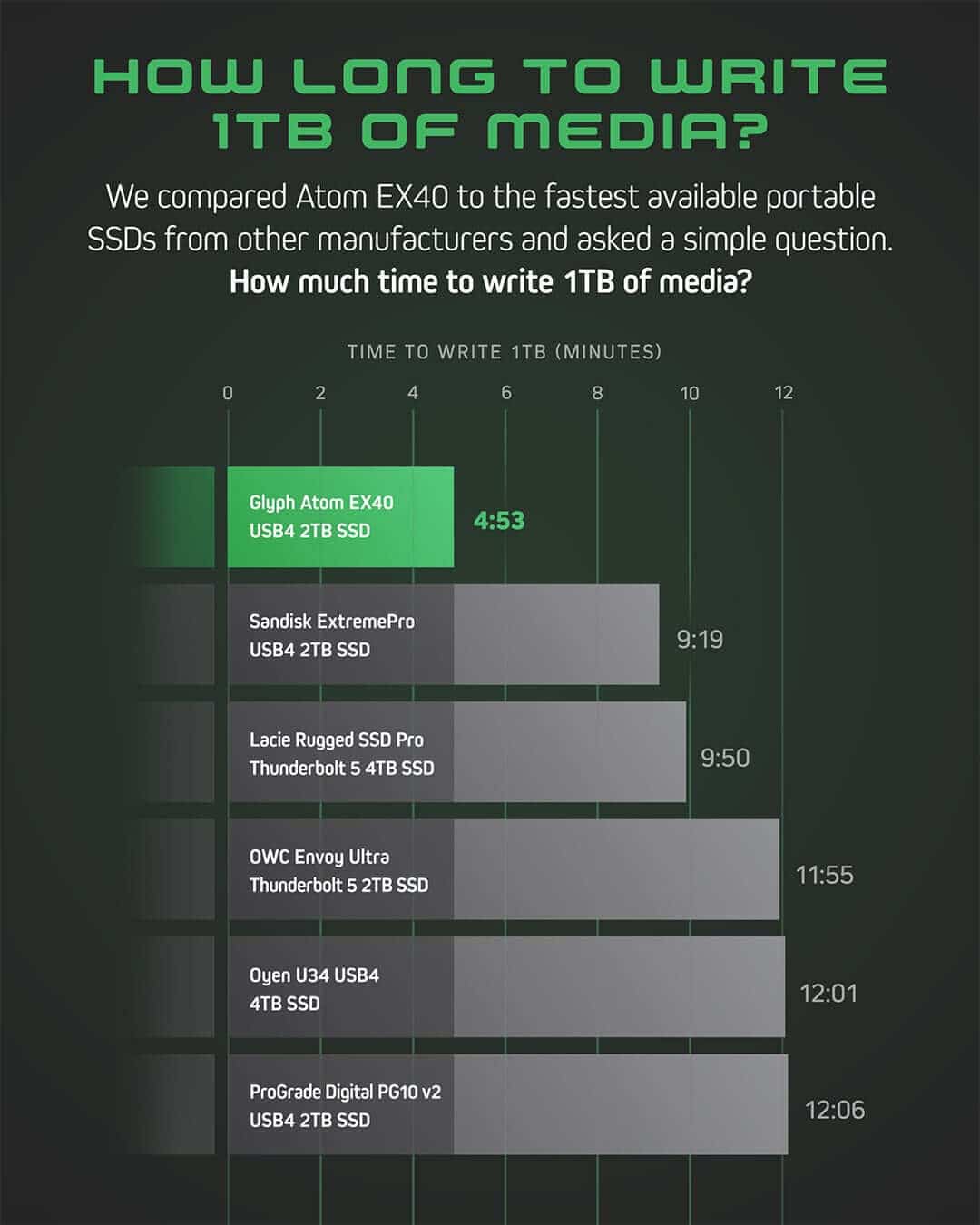
What Offloading Media Really Means
Offloading is more than just copying files from a card to a drive. It is a process designed to move data safely while confirming nothing changes along the way. A typical process may look like this:
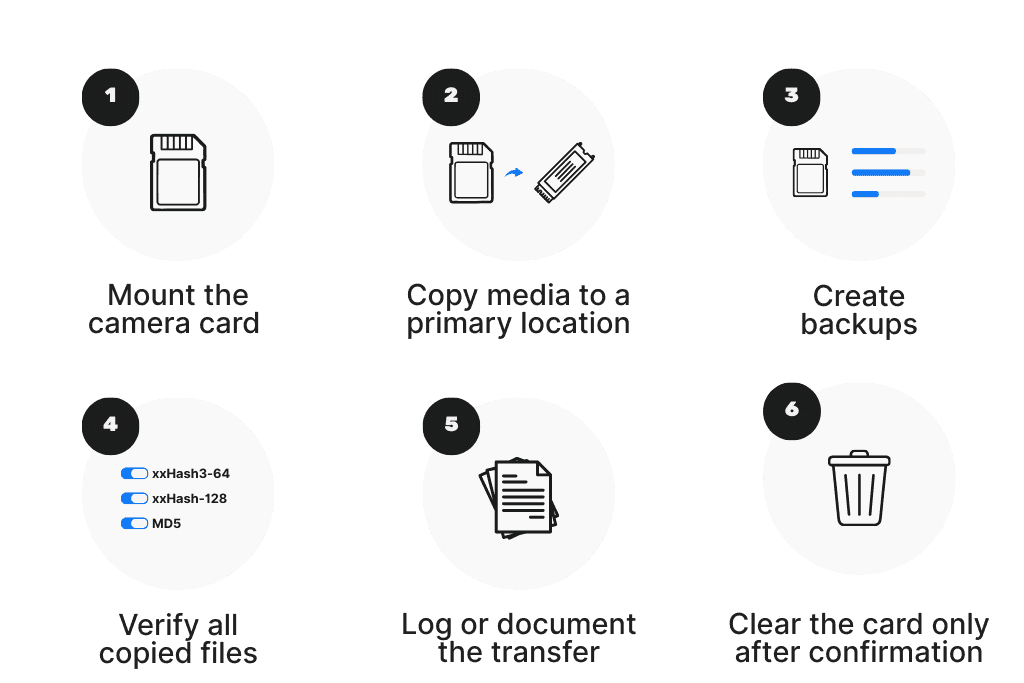
These steps ensure the footage exists in multiple places before the original media is erased.
Risks When Copying Large Amounts of Data
As mentioned above, modern cameras generate enormous file sizes. Depending on various factors, such as resolution, format, and production size, a single shooting day can produce hundreds of gigabytes or even terabytes of footage. Moving that much information applies significant amounts of stress on storage systems, connections, and computers.
If anything interrupts the process, the copy may finish with missing or corrupted files without any warning from the operating system. In fact, everything can appear completely normal until someone tries to open the clip days later. In the likelihood the shoot has moved on, this can lead to a loss of time, money, and even reputation.
Pitfalls of Outdated Technology
Older hard drives, aging card readers, and slow interfaces like outdated USB standards can introduce hidden instability. They might still function, but they cannot sustain the speeds required by current recording formats. When hardware struggles to keep up, transfers stall, disconnect, or silently fail.
For Mac workflows, certain card formats such as exFAT can also lead to inconsistent speeds, transfer failures, or corrupted data.
Upgrading storage and connection hardware is often one of the simplest ways to improve reliability.
The Importance of Verification
The biggest difference between a casual copy and a professional offload is verification.
When files are copied through the operating system, the computer indicates success as long as no IO errors were detected during transfer. However, this process does not compare the original data to the copied version. While this is generally fine when dealing with small files or replaceable data, in a professional setting with large and valuable files, extra protections are needed in case of errors. In this situation, it is advised to use offload software that performs a comparison automatically using checksum verification, ensuring every copied file is an exact match to the original.
How Verification Works
First, what does verified mean exactly? It means the bytes in the copied files have been checked against the bytes in the source to guarantee they are in fact equivalent. The only way to truly guarantee the copied file is identical to the source is to re-read the copied file from disk.
During transfer, specialized software reads the data from the source and compares it to the copy. If even a single byte differs, the software flags the issue immediately. This guarantees the backup truly matches the original.
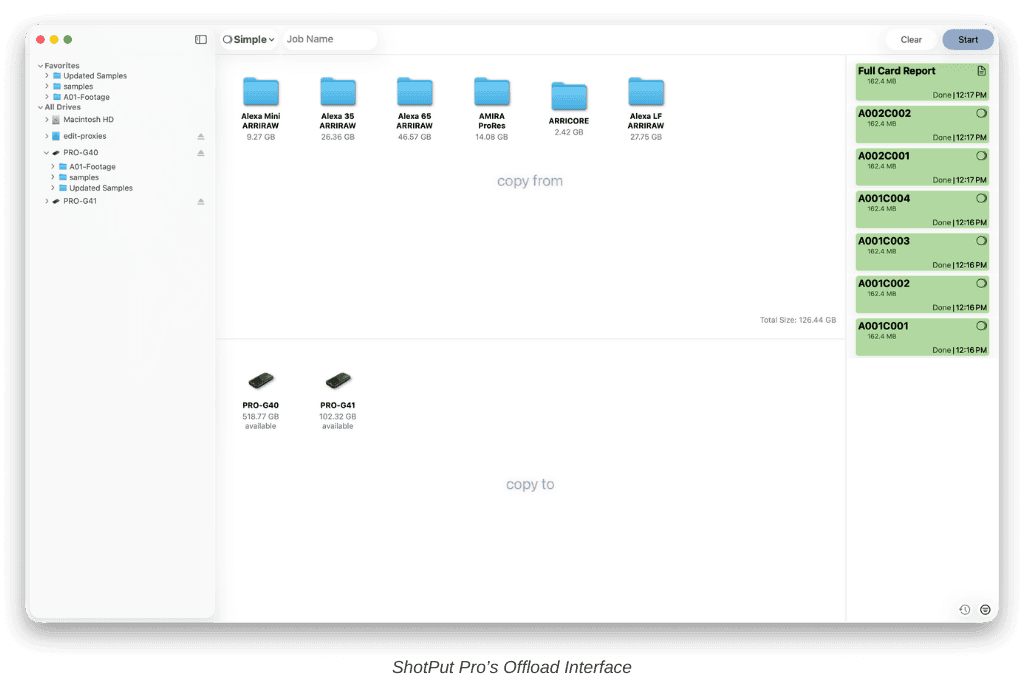
Tools such as ShotPut Pro and ShotPut Studio automate this process while also creating transfer reports. These reports provide documentation showing what was copied, its metadata, when it was copied, and whether it passed verification.
Verification Options at a Glance
Offload tools often offer several verification options depending on speed and security needs. Some prioritize faster turnaround, while others perform deeper comparisons. The key is that any verified copy is much safer than an unchecked one.
Common Issues in Data Transfer
Even well-planned workflows can run into trouble. The most common issues include:
Reformatting a card before confirming backups
Using unreliable cables or adapters
Disconnecting drives during transfers
Storing backups on the same physical device
Allowing drives to fill completely during ingest
Drives overheating due to constant IO cycles
Tips to Avoid Issues
Use fast storage for initial ingests
Maintain at least two verified backups
Standardize folder naming across the project
Replace worn cables and card readers
Monitor transfer speeds for unexpected drops
Never erase a card until verification is confirmed
Keep drives organized and clearly labeled
Bottlenecks and Performance Problems
Slow drives and weak connections often cause unpredictable behavior. Transfers may pause or fluctuate as speeds move up and down. These issues often point to hardware limitations rather than software problems.
This is a perfect example of why manufacturers of hardware products such as cameras and audio capture devices not only publish specific specification needs for their products (I/O Speed Requirements in MB/s), but also, why many manufacturers test and certify media on their websites to let customers know which storage products they can trust to work with their devices.
Conclusion
Reliable media transfer is built on preparation, verification, and consistency. From choosing capable storage hardware to following a repeatable offload process, every step contributes to protecting the footage.
When these elements come together, productions gain confidence in their workflow and can trust that the footage shot is the footage you end up with.