Audacity 4 is officially here and it represents the most massive overhaul in the software’s 25-year history.
For over two decades, Audacity has been a cornerstone of the audio community. From bedroom producers laying down their first tracks to seasoned podcasters and sound designers, nearly everyone in the creative space has relied on this legendary open-source editor at some point.
We know that creative professionals need tools that are as fast, reliable, and durable as our storage drives. The team behind Audacity has spent years rebuilding this software from the ground up to ensure it meets the demands of modern audio production.
Let's dive into all the exciting features coming to Audacity 4 and how they will supercharge your audio workflow.
A Fresh, Modern Look & Interchangeable Workspaces
Say goodbye to the clunky aesthetics of the past. Audacity 4 has been completely rebuilt on the modern Qt framework, which means it now runs natively and smoothly across macOS, Windows, and Linux.
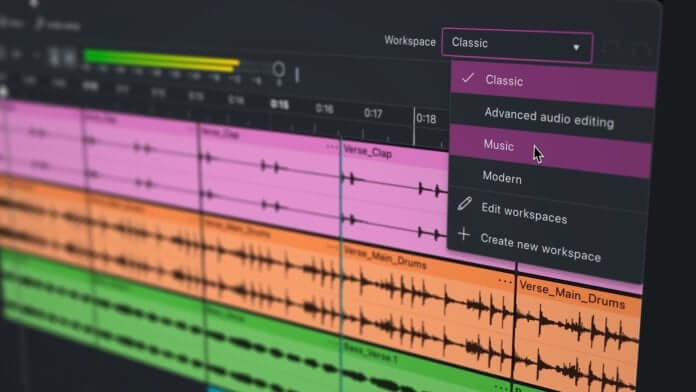
The user interface has been beautifully modernized and is fully customizable. You can now choose between Light and Dark themes (with high-contrast variants) and even set custom accent colors. But the biggest UI upgrade is the introduction of Workspaces.
Whether you’re recording a multi-track music project, restoring old audio, cutting a podcast, or doing sound design for video, you can now toggle between specialized layouts. Swap seamlessly from a 'Music' workspace (featuring bars and beats on the ruler) to a 'Podcasting' layout. Better yet, you can build and save your own Custom workspaces, meaning your ideal tools are always front and center.
Game-Changing Clip Handling & Non-Destructive Editing
For years, Audacity users had to rely on somewhat rigid editing techniques. Audacity 4 throws all those limitations out the window.
Overlapping & Grouping: Unlike previous versions, clips can now freely overlap one another. You also get advanced features like clip grouping and ripple editing.
Smart Handles: Clip interactions have been vastly simplified. You now get dedicated trim and stretch handles right on the clip, just use the top handle to trim, and the bottom handle to stretch. Simple and intuitive.
Revamped Envelopes & Splitting: The clip envelope has been totally revamped, offering precise drag-and-shape options over a highly responsive waveform. A brand-new split tool even allows you to split multiple clips simultaneously.
Direct Sample Editing: No more switching back and forth to a separate "Draw" tool. If you need to make microscopic adjustments, just zoom all the way into the waveform and manipulate the individual samples directly.
Redesigned Effects & Real-Time Processing
If you use third-party plugins, Audacity 4 is going to be your new best friend. Real-time effects processing has been drastically improved, offering flawless support for VST3, Audio Units (AU), and open-standard LV2 plugins without needing wrappers.
All of Audacity’s built-in effects—like the Compressor, Filter Curve, Graphic EQ, Limiter, and Reverb, have received beautiful, intuitive graphical redesigns. Furthermore, a new "Get Effects" tab integrates directly with MuseHub, allowing you to browse and install thousands of plugins, samples, and one-shots (both free and paid) directly within the DAW.
To help you monitor all these new sounds, Audacity 4 introduces per-track metering. Every single track now displays input levels while recording and playback levels while mixing, which is an absolute lifesaver for dialing in complex mixes. You can also switch the master playback meter to a vertical orientation to make the most of your screen real estate.
Cloud Integration (And Your Local Storage)
The new update brings heavy integration with audio.com, making it easier than ever to back up projects to the cloud, share stems with collaborators, or publish tracks straight to the community.
Of course, while cloud sharing is incredible for collaboration, heavy multi-track recording still demands lightning-fast read/write speeds and zero latency. Saving those massive .aup3 project files locally to a rugged, high-speed Glyph SSD will ensure your sessions load instantaneously and your data remains safe, whether you're in the studio or recording on the road. And don't worry about your old sessions: Audacity 4 is fully backwards-compatible and opens your old .aup3 files exactly as you left them.
The Best Part? It’s Still Free.
Product designer Alex Dawson noted that while this update paves the way for the future, the foundational spirit of the software remains untouched. Audacity 4 is still completely free, and it remains open-source under the GPL v3 license.
Audacity 4 is a monumental leap forward for audio creators everywhere. Whether you're tracking your next album directly to a Glyph drive or editing your weekly podcast, this update provides a faster, cleaner, and vastly more powerful environment to bring your audio to life.
Audacity 4 is available now. You can download it directly from the Audacity website.