In the high-stakes world of digital production, we often focus on the "Binary State" of hardware: it’s either working or it’s failed. But for the working professional, there is a crucial middle ground: The Transition Point. Managing your storage isn't just about avoiding a crash; it’s about maintaining a workflow where every component is within its optimal performance and reliability window. Here is how to understand the "Service Life" of your drives and why proactive retirement is the ultimate professional flex.
Understanding the "Service Life" Benchmark
Every professional drive comes with a TBW (Terabytes Written) rating. Some enthusiasts view these numbers as a challenge—seeing how far they can push a drive past its limit. However, in a professional environment, TBW should be viewed as a Safety Envelope.
Manufacturers establish these ratings based on rigorous JEDEC standards, ensuring the drive maintains its data integrity and speed even under heavy workloads. While modern NAND is engineered with impressive headroom, crossing the TBW threshold means you are moving from a guaranteed environment into a variable one. For a professional, variables are the enemy.
The Three Metrics of Proactive Retirement
To maintain a "Zero-Downtime" storage workflow, we recommend monitoring three key phases of a drive's life:
1. The Power-On Milestone (Reliability vs. Age)
Even if a drive isn't being written to constantly, its internal components—controllers, capacitors, and interface chips—age over time.
The Professional Standard: Industry data, including long-term studies by Backblaze, suggests that while drives can last many years, the most predictable performance occurs within the first 60 months (5 years).
The Strategy: At the 5-year mark, even a perfectly healthy drive should be considered for "Secondary Duty."
2. The Duty Cycle (Utilization Density)
Heavy editors can hit TBW ratings faster than the 5-year age mark.
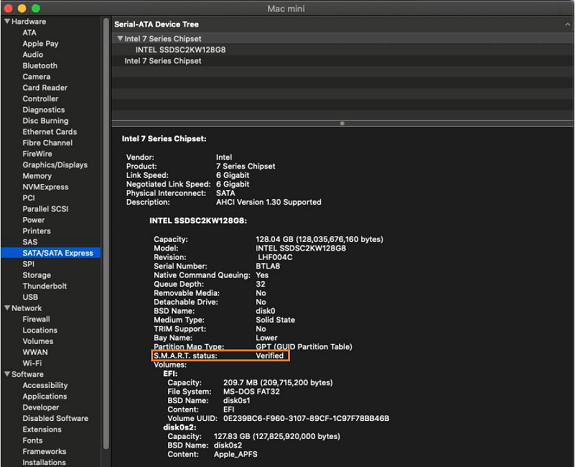
The Strategy: Use SMART monitoring tools to track your "Percentage Used." When a drive reaches 90% of its rated endurance, it has successfully fulfilled its primary mission. Replacing it now ensures you never have to deal with the performance throttling that can sometimes occur as a controller works harder to manage older NAND cells.
3. The "Cold Storage" Factor
SSDs are designed for active use. The physics of NAND flash means that unpowered cells can lose their charge over extremely long periods—a phenomenon known as data retention fade.
The Strategy: If an SSD has been sitting in a drawer for more than 2 years without power, it’s time to bring it back into the rotation or refresh the data. For long-term "set it and forget it" archiving, consider moving that data to high-capacity HDDs or LTO tape.
The "Demotion" Workflow: Give Your Drives a Second Life
Retiring a drive from your primary edit suite doesn't mean it’s useless. It just means it has been promoted to a lower-stress role:
Primary (Tier 1): Your newest, highest-spec NVMe and SSD drives. Use these for active projects and 4K/8K timelines.
Secondary (Tier 2): Drives that have crossed their 5-year or 90% TBW mark. These are perfect for scratch disks, temporary render files, or "shuttle drives" for non-critical transfers.
Legacy (Tier 3): Older storage drives used for media playback on a TV or storing non-essential personal files.
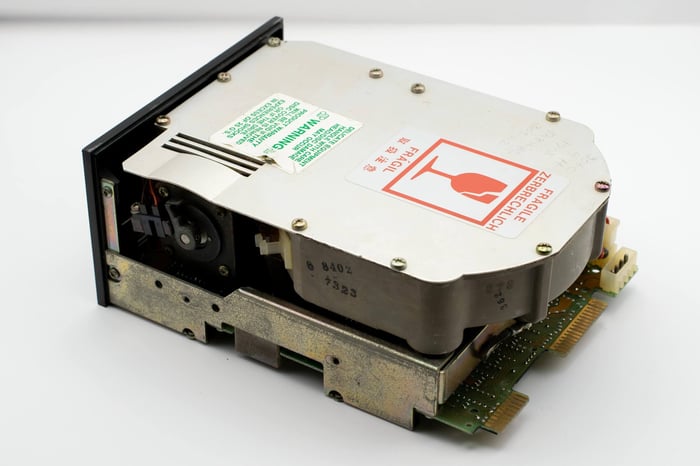 If you're still using one of these, odds are its past its prime...
Conclusion: The Cost of Certainty
In a professional workflow, the most expensive piece of equipment is not the drive—it's the time lost if a drive becomes unpredictable. By adhering to a proactive retirement schedule based on manufacturer benchmarks, you aren't just buying new hardware; you are buying certainty.
Your data is your legacy. Manage its home with the same precision you use to capture it.